

 |
|||||||||||||||||||||||||||||||||||
| Adding or Importing Sequences into your Contest | |||||||||||||||||||||||||||||||||||
|
|||||||||||||||||||||||||||||||||||
 |
|||||||||||||||||||||||||||||||||||
 |
|||||||||||||||||||||||||||||||||||
|
|
|||||||||||||||||||||||||||||||||||
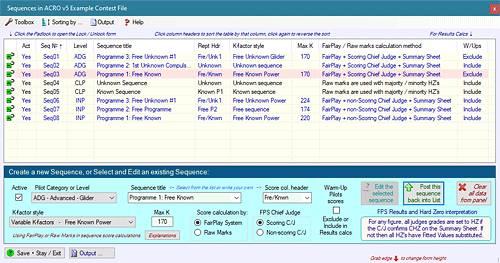
| Click the "Explanations" button to see a full description of the FPS / Raw Grades options. | |||||||||||||||||||||||||||||||||||
| To create a new sequence: | |||||||||||||||||||||||||||||||||||
|
● |
Ensure that the 'Active' check-box is
ticked Set the Pilot Level or Category from the drop-down list Select from the Sequence Title drop-list or enter your own fully descriptive title Select or enter a Report Header - this goes at the top of the scores column in Results Pick the appropriate K-factor style from the drop-list § For Free Known, Free Unknown and Free sequences enter the figures Max-K §§ Set the Score calculations method to FairPlay System or Raw Marks only §§§ For FairPlay sequences set the Chief Judge to Scoring or Non-scoring |
||||||||||||||||||||||||||||||||||
| When you're happy that everything is OK, click on the 'Add to list' button and your new sequence will be inserted at the right place in the table. | |||||||||||||||||||||||||||||||||||
 |
|||||||||||||||||||||||||||||||||||
| § K-factor style: | |||||||||||||||||||||||||||||||||||
|
|||||||||||||||||||||||||||||||||||
| §§ This is the Pilots max-K for the sequence figures but it does NOT include the Positioning K-factor. For Free Knowns, Free Unknowns and Free programmes - if you don't know what this will be you can enter 'TBA' to set the sequence up; the correct max-K value MUST however be set before you can later enter the Pilots sequence K-factors. | |||||||||||||||||||||||||||||||||||
| §§§
1. Raw Grades
settings for IAC sequences The IAC 'Hard Zero' and the plain 0.0 grade work here according to IAC scoring rules. The majority / minority status of the HZ's for any figure determines whether it should be graded all HZ's (majority case) or not; the numeric zero 0.0 remains as a nil value grade. ACRO will apply the HZ test to new files, pre 2014 legacy files remain unchanged. |
|||||||||||||||||||||||||||||||||||
|
§§§
2. Raw Marks setting for CIVA sequences Occasionally there may be less than 3 Pilots flying in a sequence - in this case FPS cannot be used, and the sequence must be revised to use Raw Marks. Edit the sequence and revise the 'Score calculations' setting to 'Raw Marks only', and the results will be calculated without FPS. Majority HZ rules still apply, any PZ's will be set to 0.0 numeric zero. |
|||||||||||||||||||||||||||||||||||
| To EDIT or change an existing sequence: | |||||||||||||||||||||||||||||||||||
|
● |
Double-click
the target sequence, or select it and click
"Edit the selected sequence". You can now revise any item in the sequence design. When finished, click 'Post the edited sequence back ...', then save it to keep the changes. |
||||||||||||||||||||||||||||||||||
| Warm-Up
Pilots - how to Include or
Exclude them from Results Calculations You can choose to either exclude your Warm-Up pilots marks from sequence results calculations or to include them. Warm-Up pilots who have their marks entered will like to know how they have performed, but where FPS is used you must exclude them from the final results, otherwise their marks will influence the overall result. You can also change this setting from all Results Output forms by clicking this button:  |
|||||||||||||||||||||||||||||||||||
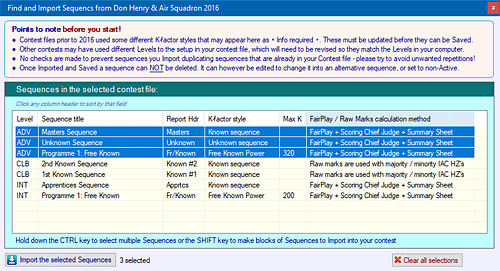
| To IMPORT sequences from another ACRO contest file: | |||||||||||||||||||||||||||||||||||
| On the Toolbox menu click "Import sequences from another Contest file", then select and open the contest which holds your target sequences. A list of the sequences is shown: | |||||||||||||||||||||||||||||||||||
 |
|||||||||||||||||||||||||||||||||||
|
● |
Select the desired
sequences and click the "Import the selected sequences" button. Note that when you Save them into your own contest file they are carefully checked for compatibility with the Levels and K-factors styles there. Any that do not match must be edited and re-posted back into the Sequences table before they can be Saved. |
||||||||||||||||||||||||||||||||||
| Note! You
can NOT delete a sequence This could critically affect data that is already entered. However - |
|||||||||||||||||||||||||||||||||||
|
● |
You can un-check the 'Active' flag and
that sequence will no longer be available for selection for score entry
etc., or.... You can set it non-Active for the time being, then edit it to revise the details and make it a 'new' one next time you need to create another sequence. |
||||||||||||||||||||||||||||||||||
|
|||||||||||||||||||||||||||||||||||
| Note
on the "Known
sequence plus three Free figures" K-factor style This unusual setting is for sequences where all Pilots fly an identical set of Known or Unknown figures that are immediately followed by three Free figures that are set to a fixed maximum K. When you use this setting, in the K-factors and Penalties form you will be able to set up firstly the Known or Unknown K's (the same for all Pilots) and then you can enter each Pilot's three Free K's. The Known and Free figures will be presented consecutively on each Pilots marks entry form. The McAully Trophy in the UK is an example of this type of sequence. In this event Standard (Sports) Level Pilots must add three figures of their own choice totalling not more than 30K to the Known sequence for the year, as a simple introduction to the process of free sequence design at higher Levels. |
|||||||||||||||||||||||||||||||||||
|
|||||||||||||||||||||||||||||||||||


